If your website is loading slowly or your images are too large, using an Image Compressor Online tool is one of the fastest and most effective solutions.
In today’s digital world, website speed plays a crucial role in user experience and SEO rankings. Large image files can significantly slow down your site, increase bounce rates, and negatively impact conversions.
This is where an Image Compressor Online tool becomes essential.
In this complete guide, you’ll learn:
- What is an Image Compressor Online tool
- Why image compression matters for SEO
- How to reduce image size without losing quality
- Best formats (JPG, PNG, WEBP)
- Step-by-step usage guide
- Pro tips to optimize images for better performance
Try the tool now:
https://siteaudithub.com/image-compressor/
What is an Image Compressor Online Tool?
An Image Compressor Online tool is a web-based solution that helps reduce the file size of images without significantly affecting their quality.
It works by:
- Removing unnecessary metadata
- Optimizing encoding
- Reducing resolution (if needed)
- Applying smart compression algorithms
These tools support formats like JPG, PNG, and WEBP, making them ideal for web usage.
Why Image Compression is Important for SEO
1. Faster Website Loading Speed
Large images take longer to load, especially on mobile devices. Compressing images reduces load time dramatically.
2. Better Search Rankings
Google recommends optimizing images as part of its Core Web Vitals guidelines.
Learn more from Google:
https://developers.google.com/speed/docs/insights/OptimizeImages
3. Improved User Experience
Users prefer fast-loading websites. Optimized images ensure smooth browsing.
4. Reduced Bandwidth Usage
Compressed images consume less data, which is beneficial for both users and hosting costs.
How to Use an Image Compressor Online (Step-by-Step)
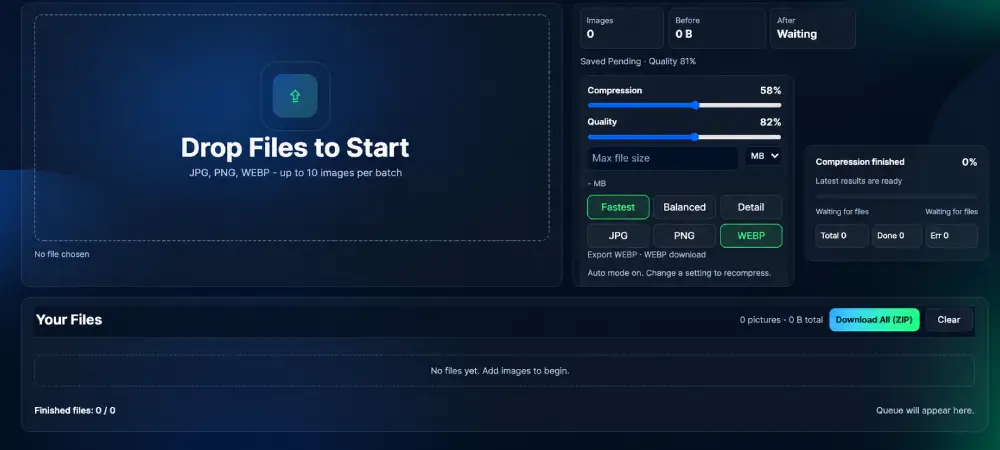
Using an Image Compressor Online tool is simple:
Step 1 – Upload Your Image
Select a JPG, PNG, or WEBP file from your device.
Step 2 – Automatic Compression
The tool processes your image using advanced algorithms.
Step 3 – Download Optimized Image
Download the compressed image instantly.
Start compressing here:
https://siteaudithub.com/image-compressor/
Best Image Formats – JPG vs PNG vs WEBP
Understanding formats is important when using an Image Compressor Online tool.
JPG (JPEG)
- Best for photographs
- Smaller file size
- Slight quality loss
PNG
- Supports transparency
- High quality
- Larger file size
WEBP
- Modern format
- Excellent compression
- Best balance between quality and size
Benefits of Using an Image Compressor Online
Using an Image Compressor Online tool provides multiple advantages:
- ✅ Faster Page Speed
- ✅ Better SEO Performance
- ✅ Lower Storage Requirements
- ✅ Improved Mobile Experience
- ✅ Faster Upload & Sharing
Common Mistakes When Compressing Images
Even when using an Image Compressor Online tool, avoid these mistakes:
❌ Over-Compression
Too much compression can degrade image quality.
❌ Choosing the Wrong Format
Always choose the right format based on use case.
❌ Ignoring Image Dimensions
Resize images before compression for best results.
Advanced Image Optimization Tips
Take your optimization further with these expert tips:
- Use WEBP Format Whenever Possible
- Enable Lazy Loading
- Use a CDN (Content Delivery Network)
- Add Proper ALT Tags
- Optimize Image Names
Best Free Image Compressor Online Tools
Here are some popular tools:
- TinyPNG
- Compressor.io
- SiteAuditHub Image Compressor ⭐
Use our free tool:
https://siteaudithub.com/image-compressor/
Who Should Use an Image Compressor Online Tool?
An Image Compressor Online tool is useful for:
- Bloggers
- Website owners
- Shopify store owners
- Developers
- Digital marketers
- Students
Why Choose Our Image Compressor Online Tool?
Our Image Compressor Online tool stands out because:
- ⭐ Fast Processing
- ⭐ No Visible Quality Loss
- ⭐ Supports JPG, PNG, WEBP
- ⭐ 100% Free
- ⭐ Easy to Use
Try it now:
https://siteaudithub.com/image-compressor/
Internal Linking Strategy
If you are working on SEO, you may also find this useful:
Check our other tools:
- SEO Analyzer Tool
- Redirect Checker
- Broken Link Checker
- Virus Checker
- Hidden Element Checker
- Free Sitemap Generator Tool
- Hidden Element Checker
Final Thoughts
Using an Image Compressor Online tool is no longer optional—it’s essential for anyone serious about website performance and SEO.
By reducing image size without compromising quality, you can:
- Improve loading speed
- Boost search rankings
- Enhance user experience
Start optimizing your images today:
https://siteaudithub.com/image-compressor/