Available now: Install Store Inspector for Shopify from the Chrome Web Store — free, no account required.
You land on a Shopify store, and it just works. Clean design, fast checkout, a review widget that actually looks good. So what’s it running? Which theme, which apps, which tracking scripts? Normally you’d have to open dev tools, hunt through the page source, and guess at script names you half-recognize.
Say a client asks you to research three competitors before a pitch, or you’re deciding which review app is worth the money by seeing what similar stores actually use. Either way, you’re clicking through pages, squinting at network requests, maybe searching a script filename to figure out what app it belongs to. It works, eventually. It’s just slow, and it’s the kind of slow that adds up over a dozen stores.
Store Inspector for Shopify skips all of that. It’s a free Chrome extension click it once on any Shopify storefront, and it hands you the theme, the installed apps, the tracking pixels, a catalog snapshot, and even a basic QA pass across a few key pages. What used to take twenty minutes of digging now takes about five seconds.
Quick answer Store Inspector for Shopify is a free Chrome extension that scans any live Shopify store and shows its theme, installed apps, tracking pixels, catalog size, page QA status, and a performance score all from six tabs in one popup, no login required.
What Store Inspector for Shopify Actually Does
There’s no account to create and nothing to configure. Install Store Inspector for Shopify, open any Shopify store, click the icon, and hit Analyze. It reads the same public page your browser already loaded the HTML, the scripts, a few JSON endpoints and turns that into something readable.
Nothing gets logged into. No admin panel, no password, no special access. It only sees what any visitor’s browser can already see, which is precisely the point: it’s a read-only lookup tool, not an automation script. Results land in six tabs Store Info, Detectors, Tracking, Statistics, QA, and Performance each one covering a different angle of the store.
A Walk Through Every Tab
Store Info: the basics, done properly
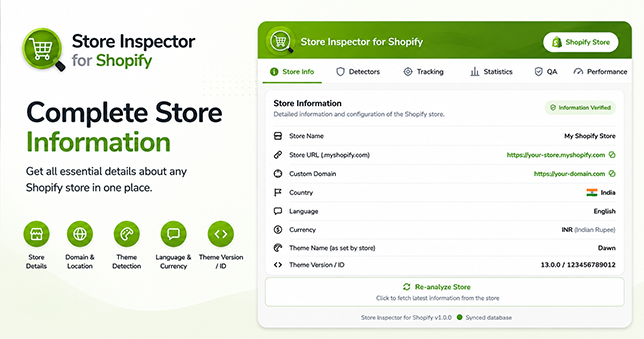
Store name, the .myshopify.com URL, custom domain, country, language, currency all there at a glance. The part that actually took work is the theme detection. Merchants rename themes constantly (“New theme work,” anyone?), so Store Inspector for Shopify checks the theme’s underlying schema name instead of trusting whatever label the store owner typed in. Renamed or not, it still tells you if a store is running Dawn, Prestige, Impact, or something else and links straight to the Shopify Theme Store listing when it’s an official theme.
Detectors: every app, categorized, with a real link
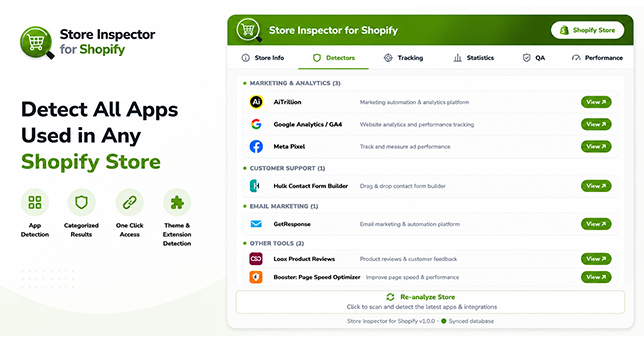
This tab does the heavy lifting. It scans for known app signatures and sorts whatever it finds into categories Reviews & UGC, Page Builder, Email Marketing, Affiliate Marketing, and a dozen more with each app linking straight to its real page, either on the Shopify App Store or the app’s own site. Not a search results page. The actual listing.
There’s also a Redundant App Detector built in, which is the one feature I haven’t seen anywhere else. Running two review apps at once, or two currency switchers, is a surprisingly common (and surprisingly expensive) mistake. This flags it automatically, right at the top of the tab, before you even start scrolling.
Tracking: pixel IDs, not just checkmarks
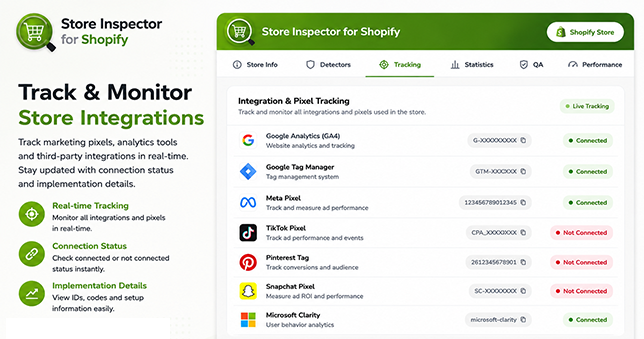
Eight platforms, checked automatically: Google Analytics (GA4), Google Tag Manager, Meta Pixel, TikTok Pixel, Pinterest Tag, Snapchat Pixel, Hotjar, and Microsoft Clarity. Each shows up as Connected or Not Connected and for the connected ones, the actual Measurement ID or Pixel ID is right there, one click to copy. No opening dev tools, no digging through network requests.
Statistics: how big is this catalog, really
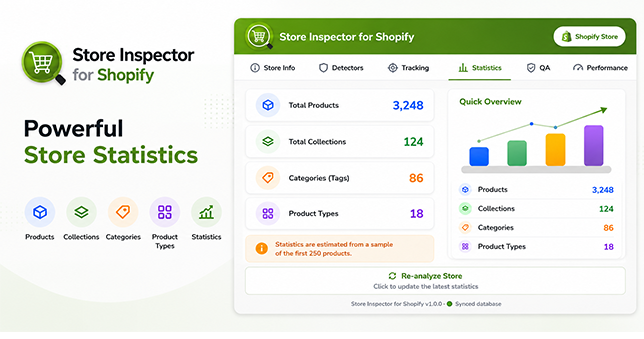
Total products, total collections, and a rough read on product categories and types. Nothing fancy just a fast way to size up a store’s inventory before you spend more time on it. Useful for a quick sanity check too: a store claiming to be a huge multi-brand retailer with twelve products in its catalog tells you something on its own.
QA: the part that runs itself
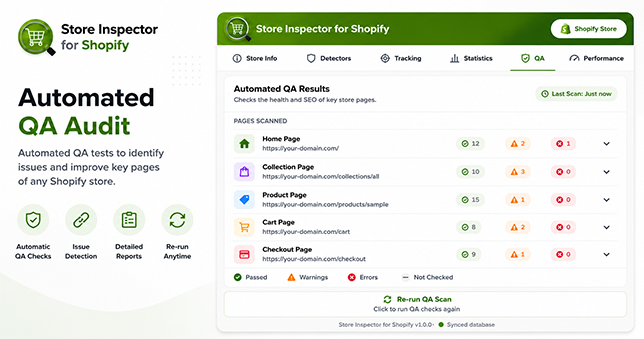
This tab finds a real homepage, product page, collection page, and contact page on its own using the store’s sitemap, with a couple of fallbacks if the sitemap’s missing something and checks each one: title and meta description present, navigation not broken, price and add-to-cart button showing up, variant selector working, collection actually populated with products, contact form has the right fields, mobile viewport configured, and whether any on-page links are dead. It starts the moment you open the tab. No button to remember.
Performance: a fast gut-check, not a full audit
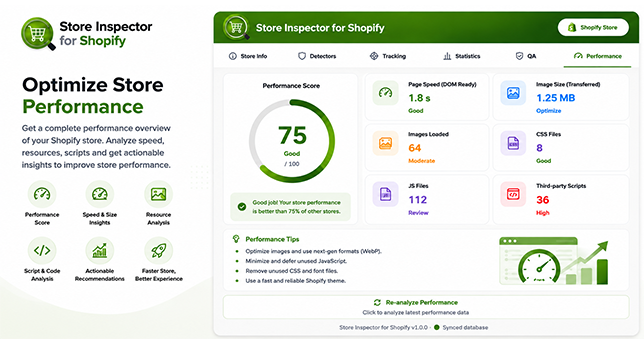
A score out of 100, plus the raw numbers behind it load time, image weight, how many CSS and JS files are loading, how many third-party scripts are running. It won’t replace a proper Lighthouse audit, but it’s a fast way to spot a store that’s carrying way more script weight than it should.
What Sets It Apart From Other Store-Spy Tools
Most tools in this space stop at a list of app names. A few specific things push Store Inspector for Shopify past that:
- Every app link goes to the app’s actual page App Store listing or its own site not a generic search.
- Official theme detections link straight to the real Theme Store listing.
- The Redundant App Detector calls out wasted spend most tools never mention.
- Pixel IDs are pulled out in full and made copyable, not just marked as present.
- The QA tab checks multiple page types on its own, without you clicking through each one.
- Broken-link checking runs across every page it looked at, not just the one you happened to open.
- Its detection database updates on a rolling basis, so accuracy doesn’t depend on waiting for a new extension version.
None of these are individually revolutionary. Together, they’re the difference between a tool that tells you an app exists and one that actually saves you time doing something about it.
What It Can (and Can’t) See
It only reads what’s already public the HTML, scripts, and JSON your browser downloads to render the page, same as any visitor gets. No admin login, no password, no permission needed from the store owner, because there’s nothing private involved.
For the QA and Statistics tabs specifically, it fetches a handful of extra pages in the background a product page, a collection page, the sitemap purely to run the same checks somewhere beyond the page you’re currently on. None of it gets stored anywhere or sent to a server. It stays in your browser.
One real limitation worth knowing: apps that never touch the storefront bulk editors, invoice tools, backend workflow automations are invisible to this (or any) browser-based tool, because they simply don’t send any code to the public site. If it doesn’t render something on the live page, there’s nothing to detect.
It’s also worth saying plainly what it doesn’t do: it doesn’t create an account anywhere, doesn’t ask for a store’s admin password, and doesn’t run any script that modifies the page you’re looking at. Close the popup, and it’s as if nothing happened because nothing did, beyond reading what was already there.
Common Questions
Is it actually free?
Yes — no account, no trial period, no upsell.
Can I run it on my own store?
Yes, and it’s arguably more useful there. The QA tab doubles as a decent pre-launch checklist.
Will it slow down the store I’m checking?
No. It’s read-only. It doesn’t submit forms, click buttons, or add anything to a cart the broken-link check specifically skips any URL that could trigger a real action like adding to cart.
How accurate is the detection, really?
Solid for anything in its signature database, which gets updated regularly. Like any tool reading page code instead of a private API, it can miss an app that only loads on checkout, or one that simply hasn’t been added yet.
Does it work on Shopify Plus and B2B stores?
Yes. It reads the same public storefront code regardless of which Shopify plan is behind it. B2B-only sections that sit behind a login won’t be visible, for the same reason a private admin panel isn’t anything gated stays gated.
What if two apps get flagged as redundant but they’re actually doing different jobs?
It happens occasionally, since the flag is based on category rather than reading each app’s exact configuration. Two “Email Marketing” apps might be intentional one for transactional email, one for campaigns. Worth a quick glance before assuming it’s wasted spend, but the flag itself is still a useful prompt to check.
Worth Installing Before Your Next Store Audit
Whether you’re prepping for a client pitch, checking out a competitor, or double-checking your own store before launch, Store Inspector for Shopify turns a slow manual process into a single click. Install it once, and every Shopify store you visit stops being a mystery.
Get it here: Store Inspector for Shopify on the Chrome Web Store.