Broken links damage SEO, frustrate users, and reduce trust. Use our Broken Link Analyzer tool to detect and fix them fast. Keep your site clean, SEO-friendly, and fully crawlable with just a few clicks.
What Is a Broken Link Analyzer?
A Broken Link Analyzer is a powerful SEO tool that scans your website for broken internal and external links. These are URLs that lead to pages that don’t exist anymore — typically showing a 404 error. Broken links not only frustrate users but also damage your search engine rankings.
⚠️ Even a few broken links can cause search engines to lower your site’s authority.
Why Do Links Break?
- Pages get deleted or moved without proper redirection
- External websites change their URLs
- Typing mistakes in href links
- Server or domain issues
Using a broken link analyzer ensures your visitors — and search engine bots — never hit a dead end.
🔗 Why Broken Links Are Bad for SEO
Google’s bots crawl your website through internal links. If they encounter broken pages:
- Crawling gets interrupted
- Page authority doesn’t flow properly
- User experience drops
- Rankings drop over time
Imagine This:
A reader arrives via search, follows a link expecting value, and hits a 404. That one broken link can break their trust.
🚫 Broken links reduce trust, increase bounce rate, and harm your conversion rate.
Fixing Them Helps:
- Improve crawlability
- Keep users on your site longer
- Strengthen internal link structure
- Recover lost SEO equity from backlinks
🧪 How Does Our Broken Link Analyzer Work?
Our tool scans your entire website in real time — directly from your browser. No installation, no setup, no delay.
🧰 Features:
- Detects both internal and external broken links
- Shows HTTP status codes (e.g., 404, 403, 500)
- Color‑coded result table for easy spotting
- Works on all modern browsers
- Export reports for analysis
➡️ Try it here
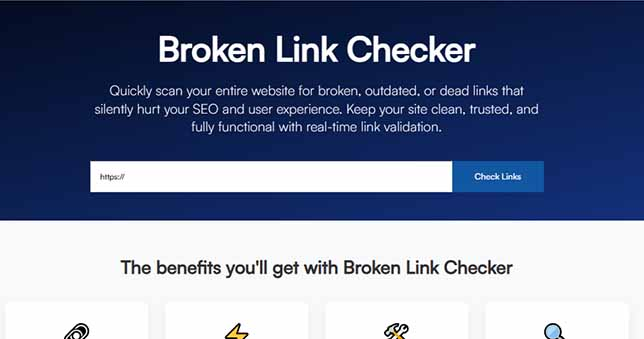
🔍 Step-by-Step: How to Use the Broken Link Analyzer
Step 1: Enter Your Website URL
Go to Broken Link Checker and enter your site address.
Step 2: Click “Analyze”
The tool will begin crawling all pages and links on your website.
Step 3: Review the Results
- Broken links (404s, timeouts)
- Source page where each link is located
- Type of link (internal or external)
- Status code
Step 4: Fix or Redirect
Once identified, edit the link or redirect it to a live page using a 301 redirect.
🔁 How to Fix Broken Links (With Examples)
✅ 1. If Page Was Moved ➡️ Add a 301 Redirect
Old URL → 301 Redirect → New URL
✅ 2. If Link Has a Typo ➡️ Edit HTML
Find the source in your CMS or code and correct the mistake.
✅ 3. If the Page No Longer Exists ➡️ Remove or Replace
- Remove the link
- Link to a similar page
- Recreate the missing page if valuable
🧠 Pro Tips to Avoid Future 404 Errors
- 🛡️ Use Consistent URL Structure – Avoid frequent changes in slugs and folder names.
- 🔄 Set Up Redirect Rules – Always redirect deleted or renamed pages properly.
- 📅 Schedule Monthly Audits – Use our Broken Link Analyzer regularly to catch issues early.
- 🔗 Be Cautious with External Links – Monitor third-party links as they may go offline.
📊 Broken Links in Google Analytics & Search Console
🔎 Use Google Analytics:
Pages with high bounce rate may contain broken links. Check the Behavior > Site Content section.
🔔 Use Google Search Console:
It flags 404 errors under the Coverage tab. Cross‑reference with your Broken Link Analyzer report for complete insights.
🌐 Internal Links vs External Links — Which One Hurts More?
Both broken internal and external links are harmful, but internal links have a direct effect on:
- User navigation
- User navigation
- SEO scoring
Broken external links show carelessness but don’t directly impact your SEO value — unless they’re high-authority backlinks lost.
🖼️ Image Prompt:
Prompt: A diagram showing Page A linking to Page B (broken), affecting flow to Page C.
Alt Text: “Illustration of broken internal link affecting SEO flow”
💡 Real Example: Fixing 404 Errors Recovered Lost Rankings
One of our users fixed over 120 broken internal links using our Broken Link Analyzer. Within 4 weeks, their site’s average keyword position improved by 17%!
Fixing broken links = better rankings, longer user time, and lower bounce rate.
🔧 Top Reasons Behind Broken Links & How You Can Avoid Them
| Cause | Solution |
| Deleted Pages | Set 301 redirects |
| Changed URLs | Update internal references |
| Typo in href | Check source code before publishing |
| Expired External Resources | Use alternatives or monitor links |
🏁 Final Thoughts: Never Ignore a Broken Link Again
Broken links quietly damage your site’s reputation. They hurt your search rankings, annoy visitors, and give a poor impression of your website’s quality.
A Broken Link Analyzer helps you:
- Detect all broken links
- Find their source
- Fix them fast
- Maintain a healthy site structure
Use the tool now to keep your site fast, SEO-safe, and trustworthy for every visitor.
🔗 Use Our Broken Link Checker Tool Now
🔁 Internal Link Suggestion:
👉 Related Tool: Redirect Checker – Trace redirect chains and final URLs