The 301 vs 302 redirect question looks small on paper. Both types send visitors from one URL to another, both happen in a split second, and nobody using your site can tell them apart. The difference lies in what each one tells search engines about the future of the old URL.
A 301 says the page has moved for good. A 302 says the move is only for now and the old address will be back. Pick the wrong one and Google may keep showing a URL you meant to retire, or drop a URL you only meant to pause. We see both mistakes regularly when we audit sites after a redesign, and most of them come from a plugin default that nobody changed.
The right choice almost always comes down to one honest question about the page you are moving.
Image Prompt 1 (featured image, file name: 301-vs-302-redirect.webp): Clean flat vector illustration in 16:9, 1200×675 pixels. On the left, a browser window with a solid green arrow going one way to a new house icon, labelled 301. On the right, a browser window with a dotted orange arrow going out and curving back to the original house icon, labelled 302. White background, soft blue and grey accents, modern tech blog style, minimal text, no logos.

What Is a 301 Redirect?
In the 301 vs 302 redirect pair, the 301 is the permanent option. When we set up a 301, we are telling every browser and crawler that the old URL is finished and the new one replaces it. The server answers the old URL with the status code 301 Moved Permanently and a Location header that holds the new address. Browsers follow it straight away and, because the move is permanent, they also remember it. The next time the same browser requests the old URL, it may skip the server completely and go to the new address from its own cache.
Search engines read a 301 as a strong instruction. Google’s guide on redirects and Google Search explains that a permanent redirect is used as a signal that the target URL should be the canonical one. Over time, the new URL takes the old one’s place in search results, and the old URL is treated as an alternate name for it.
Typical reasons to pick the 301 side of a 301 vs 302 redirect choice include changing a page’s slug, merging two articles into one, moving the whole site to HTTPS or to a new domain, and replacing a discontinued product page with its closest successor.
What Is a 302 Redirect?
A 302 is the temporary side of the 301 vs 302 redirect pair. The status code reads 302 Found, and it also carries a Location header with the address visitors should go to. The key difference is the promise behind it: the original URL is still the real home of the content, and the redirect will be removed later. MDN’s reference on the 302 Found status describes it as a resource that has been moved temporarily to the URL in the Location header.
Caching is another 301 vs 302 redirect difference. Because the move is temporary, browsers do not cache a 302 in the same strong way. They keep asking the original URL each time, which is exactly what you want if the redirect is going to be switched off next week.
Google follows a 302 too, but it does not use it as a canonical signal. In practice, that means Google is likely to keep the original URL in search results while the temporary redirect is in place.
301 vs 302 Redirect: The Key Differences at a Glance
When clients ask us to explain the 301 vs 302 redirect difference quickly, this table usually settles it. Every row comes back to the same idea: permanent versus temporary.
| Point of comparison | 301 redirect | 302 redirect |
|---|---|---|
| Meaning | Moved permanently | Moved temporarily |
| URL Google tends to show in search | The new URL | The original URL |
| Canonical signal | Yes, points to the target | No |
| Browser caching | Cached strongly, can be hard to undo | Not cached the same way, easy to switch off |
| Best for | Slug changes, migrations, merged pages, HTTPS moves | Maintenance pages, short tests, seasonal or stock based swaps |
| Risk if used wrongly | Old URL disappears from search when you wanted it back | Old URL stays in search when you wanted it replaced |
In the 301 vs 302 redirect debate, neither one is “better” than the other. Each one is correct for its own job. Problems only start when the type does not match the real intention behind the move.
How Google Treats a 301 vs 302 Redirect
Most of the confusion we hear about the 301 vs 302 redirect choice is really about SEO, and much of it comes from older advice that no longer holds. It helps to separate what Google has documented from what people tend to assume.
Which URL gets indexed
Indexing is the main practical 301 vs 302 redirect difference. With a 301, Google treats the target URL as the canonical version and moves it into search results. With a 302, Google treats the original URL as the one that matters and tends to keep it indexed. If you moved a page for good but used a 302, your old URL can stay in Google long after the new page went live, and the new URL may struggle to show up in its place.
The myth that a 302 throws away link value
For years, SEO guides warned that a 302 passes no link value at all, and this myth still shapes a lot of 302 redirect SEO advice. That view is outdated. Google has said publicly that all of its supported redirect types can pass ranking signals. The real problem with using a 302 for a permanent move is not lost value. It is that Google keeps the wrong URL as the main version, which creates mixed signals and slower indexing of the page you actually want to rank.
What happens with a long running 302
Google representatives have said over the years that a temporary redirect left in place for a long time may eventually be treated more like a permanent one. There is no published timeline for this, though, and relying on Google to guess your intention is risky. When a move is permanent, using a 301 from day one removes the guessing completely. That is the simplest way to handle 302 redirect SEO risks and keep the 301 vs 302 redirect choice from becoming a ranking problem.
If you are not sure which type a URL is currently using, our guide on how to check a 301 redirect walks through four ways to see the real status code.
When to Use a 301 Redirect
On the sites we manage, more than nine out of ten redirects end up as 301s, because most URL changes are meant to last. A simple permanent vs temporary redirect test helps: if you would be surprised or annoyed to see the old URL come back, the move is permanent.
You changed a page’s URL or slug. Moving a page from /services/old/ to /services/ is a permanent change. The old address should hand everything over to the new one.
You merged or consolidated content. When two thin articles become one strong guide, both old URLs should point to the new guide with a 301.
You moved to HTTPS or a new domain. Every HTTP URL and every old domain URL should send visitors to its new version permanently.
A product or service was discontinued for good. Redirect it to the closest replacement or the most relevant category page, not to the homepage.
You fixed your preferred domain version. Choosing between www and non www, or adding a trailing slash, is a permanent setting and should use a 301.
For all of these, the 301 vs 302 redirect decision is simple. The page is not coming back, and Google should know that.
When to Use a 302 Redirect
On the other side of the 301 vs 302 redirect choice, a 302 is the right tool far less often, but when the situation fits, it is clearly the better choice. We reach for it only when we are sure the original URL will be used again.
Short maintenance or downtime. If a page is being rebuilt for a day or two, a 302 can send visitors to a holding page while the original keeps its place in search.
Testing a new page design. When you want to send visitors to a test version of a page for a short period, a 302 keeps the original URL as the main one in Google.
Seasonal or campaign pages. A /sale/ URL that points to a holiday landing page for a few weeks each year is a good fit, as long as the redirect is removed after the campaign.
A product temporarily out of stock. Some sites send visitors to a similar product while stock is low. Once the product is back, the redirect comes off and the original page returns.
Location or language based routing. Sending visitors to a regional version of the site based on where they are is often done with a temporary redirect, because the original URL still serves other visitors.
Before you use a 302, decide when it will be removed and write that date down. A temporary redirect without an end date is how most accidental long running 302s start, and it is the most common 301 vs 302 redirect error we find in audits.
What About 307 vs 308 Redirect Codes?
Every time we explain the 301 vs 302 redirect difference, someone asks about 307 and 308, which are close cousins of the same pair. They are newer codes that do the same jobs with one extra rule: they keep the original request method.
Here is why that matters. When a browser sends a form using POST and receives a 301 or 302, it is allowed to repeat the request as a GET to the new URL, which can drop the form data. A 307 (temporary) and a 308 (permanent) do not allow that change. The browser must send the same method and the same data to the new address. MDN’s page on the 308 Permanent Redirect covers this rule in detail.
| Code | Type | Keeps the request method? | Common use |
|---|---|---|---|
| 301 | Permanent | No guarantee | Normal page moves |
| 302 | Temporary | No guarantee | Normal temporary moves |
| 307 | Temporary | Yes | Temporary moves for forms and APIs |
| 308 | Permanent | Yes | Permanent moves for forms and APIs |
Image Prompt 2 (file name: 307-vs-308-redirect.webp): Flat vector illustration in 16:9, 1200×675 pixels. A web form icon sending a small envelope marked POST along an arrow to a server, then a second arrow carrying the same envelope to a new server, showing the data stays intact. Two small tags on the arrows read 307 and 308. White background, blue and purple accents, modern tech blog style, minimal text, no logos.

For normal web pages that people read, the 307 vs 308 redirect choice rarely changes anything for SEO. Google treats a 308 like a 301 and a 307 like a 302. If you see a “307 Internal Redirect” in Chrome while testing an HTTPS site, that is usually the browser applying an HSTS rule on its own, not a redirect your server sent.
Common Mistakes With a 301 vs 302 Redirect
Most 301 vs 302 redirect problems we fix are not caused by people choosing badly. They come from settings nobody looked at. These are the ones we run into most.
Leaving the plugin default in place
Several WordPress plugins, hosting panels and CMS tools create a 302 unless you choose otherwise. A whole migration can end up running on temporary redirects because the default was never changed. Always check the redirect type field before saving a rule, because the 301 vs 302 redirect setting is easy to miss.
Using a 301 for something that is coming back
The opposite mistake is harder to undo. Because browsers cache a 301 strongly, visitors who saw it may keep going to the new URL even after you remove the rule. If there is any real chance the original page will return soon, a 302 is the safer choice.
Stacking several redirects together
A 302 that points to a URL with a 301, which then points to a third URL, mixes signals and slows the page down. Each URL should reach its final page in one hop. Our guide on what a redirect chain is explains how to collapse these into a single rule.
Forgetting to update internal links
Even a perfect 301 is a detour for your own links, no matter how you settled the 301 vs 302 redirect question. Menus, footers and blog posts should point straight at the new URL. Redirects are there for outside links and bookmarks you cannot edit.
How to Set Up a 301 or 302 Redirect
The method depends on where your site’s redirects are managed. Whatever tool you use, the key step is the same: choose the redirect type on purpose, based on your permanent vs temporary redirect decision for that URL.
WordPress with Rank Math
Go to Rank Math, then Redirections, and click Add New. Enter the source URL, the destination URL, and pick the redirect type from the dropdown: 301 Permanent Move, 302 Temporary Move or 307 Temporary Redirect. Save the rule and test it straight away.
Apache servers
On Apache, a single line in the .htaccess file can create either type. The only difference is the number at the start of the rule.
Redirect 301 /old-page/ https://www.example.com/new-page/
Redirect 302 /sale/ https://www.example.com/holiday-sale/
Nginx servers
On Nginx, the same choice is made inside a location block. Use “return 301” for permanent moves and “return 302” for temporary ones.
location = /old-page/ { return 301 https://www.example.com/new-page/; }
location = /sale/ { return 302 https://www.example.com/holiday-sale/; }
After setting up any rule, confirm the server is sending the code you expect. The HTTP header checker shows the status code and Location header for any public URL.
301 vs 302 Redirect Examples From Everyday Site Work
Rules are easier to apply once you see them in real situations. These are three cases we deal with often, and each one shows how the 301 vs 302 redirect choice plays out in practice.
An online store renames a category
A clothing store moves its shirts category from /men/tops/ to a simpler /men/shirts/ path as part of a new navigation. The old category will never return, the new one replaces it fully, and other sites have linked to the old address. For this store, the 301 vs 302 redirect answer is a clear 301. Every old category URL, including filtered and paginated versions that get traffic, should point to its closest new match.
A blog takes a guide offline for a rewrite
A popular guide is being rewritten over three days, and the team does not want visitors to land on a half finished page. They send the guide’s URL to a related article for those three days, then remove the rule. The original URL is the one that should stay in Google the whole time, which makes this a textbook 302 in the 301 vs 302 redirect choice.
A service business runs a festival offer
Every year, the /offer/ page on a service site points to a festival landing page for two weeks, then goes back to the standard offer page. The original URL is used all year and is the one people bookmark. A 302 fits here, with a calendar reminder to remove it when the festival ends.
In all three cases, the deciding factor was not traffic, link value or technical setup. It was the honest answer to whether the original URL would be used again. That single question settles most 301 vs 302 redirect decisions.
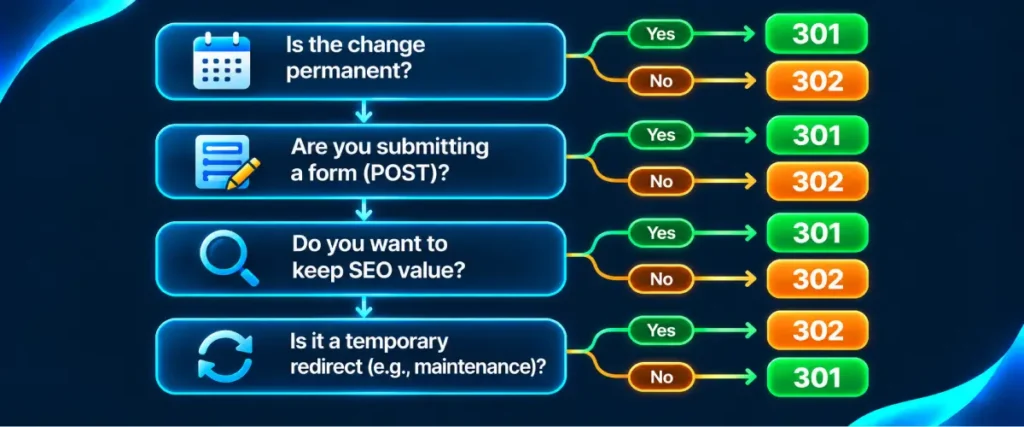
A Quick Way to Decide Between 301 and 302
When we are unsure, we run through four questions before writing a rule. They take less than a minute and remove almost all of the guesswork from the 301 vs 302 redirect decision.
- Will the original URL be used again? If no, use a 301. If yes, keep going.
- Do you know when it will come back? If you can name a date, a 302 fits. If not, the move is probably permanent in practice, and a 301 is safer.
- Does the request carry form data or API calls? If yes, use 308 for permanent moves and 307 for temporary ones.
- Which URL should Google show in search during this period? If the new one, use a 301. If the original, use a 302.
If the answers point in different directions, go with the answer to the last question. Search visibility is usually the reason the 301 vs 302 redirect choice matters at all, and it should guide every redirect you add.
Image Prompt 3 (file name: 301-vs-302-redirect-decision-checklist.webp): Flat vector infographic in 16:9, 1200×675 pixels. A simple vertical flowchart with four rounded question boxes connected by arrows, each splitting into two paths that end in a green box labelled 301 or an orange box labelled 302. Small icons beside the boxes: a calendar, a form, a magnifying glass and a refresh symbol. White background, clean sans serif labels, minimal text, no logos.
FAQs
Is a 301 or 302 redirect better for SEO?
In the 301 vs 302 redirect comparison, neither is better in general. A 301 is right when the move is permanent, and a 302 is right when the original URL will return. Using the type that matches your real intention is what matters for SEO.
Does a 302 redirect hurt SEO?
Not when it is used for a genuinely temporary move. Good 302 redirect SEO is about matching the type to the plan. It causes problems when used for a permanent change, because Google may keep showing the old URL instead of the new one.
Can I change a 302 to a 301 later?
Yes. Fixing a 301 vs 302 redirect mistake is simple: edit the rule, change the type to 301 and save it. Google will pick up the change the next time it crawls the old URL.
How long does Google take to process a 301 redirect?
It depends on how often Google crawls the URL. Popular pages can update within days, while rarely crawled pages can take weeks. Keep the redirect in place well after the new URL appears in search.
What is the difference between 307 vs 308 redirect codes?
A 307 is temporary and a 308 is permanent. Both keep the original request method, which makes them useful for forms and APIs. For normal pages, they behave like a 302 and a 301.
How do I know which redirect my site is using?
Run the URL through a redirect checker to see which side of the 301 vs 302 redirect choice it falls on. It shows the status code at every hop, which tells you whether each redirect is a 301, 302, 307 or 308.
Find Out Which Redirects Your Site Is Really Sending
Most sites do not have a strategy problem with redirects. They have a visibility problem: nobody knows which rules are 301s and which are 302s until rankings start to slip. Paste your most important old URLs into our free redirect checker, see the status code behind each one, and switch any accidental 302 to the permanent redirect it was meant to be.