Shopify Integration Services
Copying orders into spreadsheets and updating stock by hand slows every team down. Our Shopify integration services connect your Shopify store to the tools you already use, so orders, stock, customers and invoices move on their own and stay correct.
- Free, written quote
- Built on staging first
- Support after launch
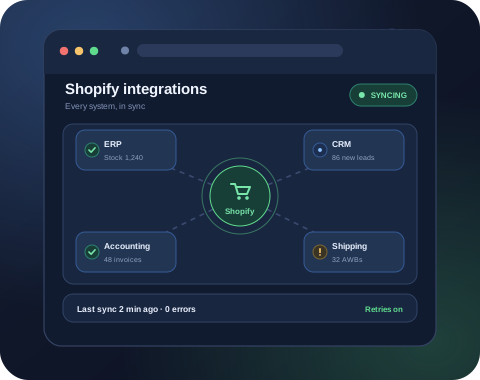
About our Shopify integration service
Most growing brands run on more than one system. Orders come in through Shopify, stock lives in an ERP or warehouse tool, invoices go out from accounting software, and customer details sit in a CRM. When these systems do not talk to each other, someone on your team becomes the connection, copying data between screens every day.
Our Shopify integration services replace that manual work with reliable connections. We use the Shopify Admin API, webhooks and Shopify Flow to send data where it needs to go, in the right format and at the right time. When a ready made app already does the job well, we set it up and test it. When it does not, we build a custom connection around how your business actually works.
Every Shopify integration we build includes logging and alerts. If a supplier feed is late or another system goes down, the connection waits, retries and tells your team, instead of losing orders or showing wrong stock to buyers.
Signs your Shopify store needs an integration
Tick a few of these and we should talk.
- Your team copies orders, stock or customer details between Shopify and other tools by hand every day.
- Products sometimes show as in stock on your Shopify store when the warehouse has already run out.
- Invoices, GST or tax entries are made manually from Shopify order exports at the end of the week or month.
- You tried an app connector, but it misses fields, breaks on certain orders or cannot match how you work.
What you get with our Shopify integration service
One clear scope, done properly and tested before launch.
- ERP and Inventory Sync
- CRM and Marketing Data
- Accounting and Invoices
- Shipping and Fulfillment
- Custom API Connections
- Monitoring and Error Alerts
Moving to Shopify from another platform first? Start with our Shopify migration service and we will plan the integrations alongside it.
That's me, let's talk →What our Shopify integration services include
Every connection your Shopify store needs, built and monitored.
ERP and Inventory Sync
Stock levels, products and orders kept in step between Shopify and your ERP or warehouse system.
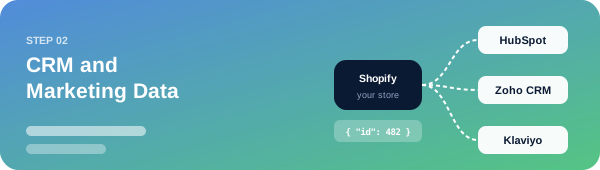
CRM and Marketing Data
Customers, orders and tags sent to your CRM and email tools for better follow ups.
Accounting and Invoices
Orders, refunds and taxes posted to your accounting software without manual entry.
Shipping and Fulfillment
Orders pushed to your courier or 3PL, with tracking numbers sent back to Shopify.
Custom API Connections
Private Shopify apps and middleware for systems that have no ready made connector.
Monitoring and Error Alerts
Logs, retries and alerts that show what synced, what failed and why.
Your Shopify integration project, built layer by layer.
- 01ERP and Inventory Sync
- 02CRM and Marketing Data
- 03Accounting and Invoices
- 04Shipping and Fulfillment
Stock levels, products and orders kept in step between Shopify and your ERP or warehouse system.
Customers, orders and tags sent to your CRM and email tools for better follow ups.
Orders, refunds and taxes posted to your accounting software without manual entry.
Orders pushed to your courier or 3PL, with tracking numbers sent back to Shopify.



How Shopify integration works
Webhooks, the Admin API and a source of truth for each field.
Every Shopify integration moves data between your Shopify store and another system through an agreed path. Shopify sends webhooks when something happens, like a new order or a refund, and the Shopify Admin API lets another system read or update products, stock, customers and orders.
In the middle there is often a small app or middleware service. It receives the data, changes it into the format the other system expects, sends it on and records the result. This layer is what keeps an integration reliable, because it can wait, retry and report when something goes wrong.
Before we build anything, we decide which system is the source of truth for each piece of data. For example, your ERP may own stock and prices, while Shopify owns orders and customer accounts. Getting this right early prevents two systems from overwriting each other.
ERP and inventory integration
Correct stock everywhere, and no more overselling.
Overselling is one of the most common reasons brands ask for Shopify integration services. When stock lives in an ERP or warehouse tool and Shopify is updated by hand, a product can sell out in the warehouse while buyers can still order it online.
We connect Shopify to your ERP or inventory system, so stock levels, prices and product details flow in the right direction and new orders reach the warehouse as soon as they are placed. For multi location businesses, we map each warehouse or shop to the matching Shopify location.
For large catalogs, we combine instant updates for each change with a scheduled full stock check. The check compares both systems and corrects any difference, which catches the rare update that fails along the way.
CRM and marketing integrations
Customer and order data your sales team can use.
Your sales and marketing teams work better when they can see what customers actually buy. We connect Shopify to CRMs such as HubSpot, Zoho CRM and Salesforce, so customer records, order history and tags stay up to date without exports.
The same data can power email and WhatsApp follow ups. A first order, a repeat purchase or an abandoned checkout can move a customer into the right list or sequence automatically, using the tools your team already knows.
We only send the fields each tool needs and respect the consent your buyers gave at checkout, which keeps your lists clean and your messages compliant.
Ready to get started with Shopify integration?
Share your website link and what you need. You get a clear scope, price and timeline, free and with no obligation.
Accounting and invoicing integration
Sales, refunds and taxes posted without retyping.
End of month accounting gets slow when every Shopify order has to be entered again. We connect Shopify to accounting software such as Tally, Zoho Books, QuickBooks and Xero, so sales, refunds, discounts, shipping charges and taxes are posted correctly.
- For Indian businesses we make sure GST details, HSN codes and invoice numbering follow your accountant's format. Payouts and fees can be matched to orders, which makes reconciliation much easier.
- We test with real examples first, including partial refunds, discount codes and cash on delivery orders, because these are the cases where simple connectors usually get the numbers wrong.
Shipping, courier and 3PL integration
Orders to the courier, tracking back to Shopify.
A smooth delivery starts with clean order data. We connect your Shopify store to courier aggregators, shipping partners and third party warehouses, so new orders are pushed for fulfillment without retyping addresses.
Tracking numbers and delivery status come back into Shopify, and buyers receive the standard Shopify shipping updates with the right tracking link. Returns and failed deliveries can update the order as well.
Where you ship from more than one place, we route each order to the right warehouse based on stock, location or product type, following the rules your team already uses.
Custom Shopify apps and API connections
For systems with no ready made connector.
Some systems have no ready made connector, or the available app cannot handle the way your business works. In these cases we build a custom Shopify app with only the permissions the integration needs.
Custom connections can read supplier feeds, push data to an internal database, or link Shopify with an older system that only accepts files. We handle the Shopify API limits properly, which keeps large syncs stable even during a sale.
You own the code and the app. We document how it works, where it runs and how to change settings, which means you are never locked into one developer.
Why choose SiteAuditHub for Shopify integration
What makes our Shopify integrations reliable.
One source of truth
We agree which system owns each piece of data, so numbers never fight each other.
Built to survive errors
Retries, queues and alerts are part of every build, not an extra.
Apps first, code when needed
We only write custom code when a reliable app cannot do the job.
Tested on a copy first
Every connection is proven on a development store before it touches live orders.
Clear handover
You get simple notes on what syncs, how often and where to check the logs.
Automation with Shopify Flow
Simple rules your team can change later.
Not every task needs custom code. Shopify Flow can tag high value orders, hold risky orders for review, alert your team on low stock or send data to another app when something happens.
We use Flow for rules your team may want to adjust later, and custom integration code for heavy data syncing. This keeps simple automations easy to edit without a developer.
Combined with your other tools, Flow and webhooks can remove many small daily tasks that slowly take hours of your team's week.
Monitoring, logs and error handling
Know what synced, what failed and why.
An integration is only useful if you can trust it. Every Shopify integration we build keeps a log of what was sent, what was received and what failed.
When a call fails, the integration retries it. If it still fails, your team gets an alert with a clear message, such as a missing SKU or a closed accounting period, instead of a silent gap in your data.
A simple status view shows the last successful sync for each connection. Your team can check it in seconds before a sale or at the end of the day.
Choosing an app or a custom Shopify integration
When an app is enough, and when custom work pays off.
The Shopify App Store has connectors for many popular tools, and for simple needs they are often the fastest and cheapest option. We check whether an app supports the fields, volume and edge cases you need before recommending it.
A custom Shopify integration makes sense when you have special pricing rules, several warehouses, an older ERP or a process no app supports. It costs more upfront, but it follows your workflow exactly and avoids monthly app fees that grow with order volume.
Many projects use both: a trusted app for one system and a small custom connection for the gap it leaves. We explain the trade offs in plain words before any work starts.
How our Shopify integration process works
Map the data, build on a test store, then launch and watch.
- 1. Map the dataWe list every system, every field and every direction of sync, and agree on which system is the source of truth for each one.
- 2. Build and testWe build the connection on a development store first and test it with real order, refund and stock scenarios.
- 3. Launch and monitorWe switch it on, watch the first days of live data closely and hand over logs, alerts and simple documentation.
Have a question about Shopify integration?
Message us on WhatsApp or send the form. Someone from our Shopify team replies within one business day.
Free tool: Full Site Audit
Before you connect new systems, run a free audit of your Shopify store to catch speed, SEO and broken link issues.
Further reading: Shopify's developer documentation for the Admin API explains the API our integrations are built on.
Shopify integration FAQs
What are Shopify integration services?
Shopify integration services connect your Shopify store to other business software, such as an ERP, CRM, accounting tool, shipping partner or marketing platform. Data like orders, stock, customers and invoices then moves between them automatically, without manual copying.
Which systems can you connect to Shopify?
We commonly connect Shopify to ERPs and inventory tools, CRMs like HubSpot, Zoho CRM and Salesforce, accounting software like Tally, Zoho Books, QuickBooks and Xero, shipping partners and 3PLs, and marketing tools. If a system has an API, a file feed or a database we can safely read, we can usually connect it.
Do you use apps or build custom integrations?
Both. If a well supported app already does what you need, we set it up, configure it properly and test it. If no app fits, or the app misses important fields, we build a custom Shopify app or middleware for your workflow.
How long does a Shopify integration take?
A simple app based connection can be ready in a few days. A custom two way integration with an ERP, including testing, usually takes two to six weeks, depending on the number of systems, fields and edge cases.
Will the integration slow down my Shopify store?
No. Integrations run in the background through the Shopify Admin API and webhooks. They do not add scripts to your storefront, so page speed for your buyers stays the same.
What happens if the other system goes down?
Our integrations log every sync, retry failed calls and alert your team when something needs attention. Orders and stock updates are queued and sent once the other system is back, instead of being lost.
Can stock update in real time between Shopify and my warehouse?
Yes. Stock changes can be sent within seconds through webhooks and API calls. For large catalogs we often combine instant updates for changes with a scheduled full check, which catches anything that was missed.
Is my store data safe during integration work?
Yes. We use a private app with only the permissions the integration needs, keep API keys out of shared documents, and build and test on a development store before touching your live Shopify store.
Can you fix an integration another developer built?
Yes. We review the existing code or app setup, find where data goes wrong, and either fix it or rebuild the parts that cannot be made reliable.
Do you integrate Shopify with Indian tools like Tally and Shiprocket?
Yes. We work with Indian brands and regularly connect Shopify to tools such as Tally, Zoho Books, Shiprocket and other courier partners, including GST details on invoices.
Can you connect Shopify with a marketplace or a second store?
Yes. We can sync products, stock and orders between Shopify and marketplaces, or between two Shopify stores, such as a retail and a wholesale store sharing the same inventory.
Do I need Shopify Plus for integrations?
No. Most integrations work on every Shopify plan through the Admin API. Some advanced checkout and automation features are only on Shopify Plus, and we tell you upfront if your plan affects what is possible.
What does a Shopify integration cost?
It depends on the number of systems, the direction of sync and how much custom logic is needed. After a short call and a look at your systems, we send a fixed, written quote with the scope and timeline.
Do you support the integration after launch?
Yes. APIs change and businesses grow. We offer ongoing support to monitor syncs, update the integration when Shopify or the other system changes, and add new data as you need it.
You may also need
Services that often go hand in hand with Shopify integration.
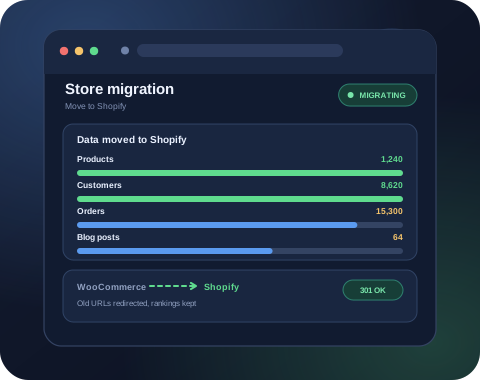
Shopify Migration Services
Move your store to Shopify from WooCommerce, Magento, Wix and more, with data and SEO kept safe.
View service →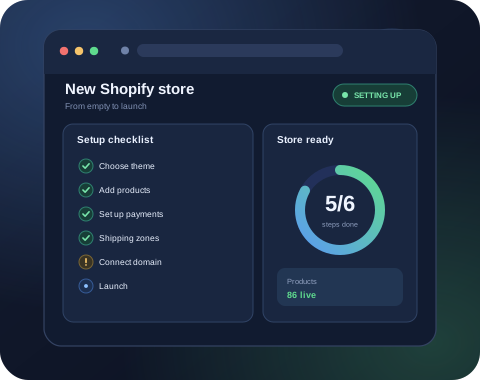
Shopify Store Setup Services
A new Shopify store set up end to end, with theme, products, payments and shipping ready to sell.
View service →
Custom WordPress Plugin Development
Plugins and features built for your exact need, from small tweaks to full API integrations.
View service →Get a free quote for Shopify integration
Tell us what you need and we will reply with a clear scope, price and timeline. No obligation.
We usually reply within one business day.